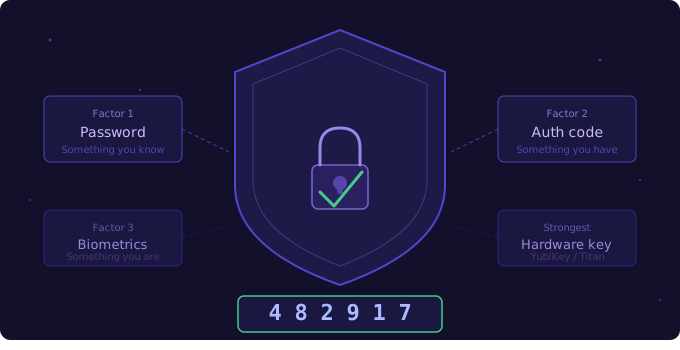

"According to Microsoft, over 99.9% of compromised accounts did not have multi-factor authentication enabled."
If your business is still relying on passwords alone to protect accounts, you're operating with a security gap that attackers actively exploit. Passwords get stolen, guessed, and leaked in data breaches every single day.
Why passwords fail
Passwords are fundamentally broken as a sole authentication mechanism. Here's why:
- Credential stuffing - attackers take leaked username/password pairs from one breach and automatically try them on hundreds of other services
- Phishing - users hand over passwords willingly when deceived
- Brute force - weak passwords can be cracked in seconds with modern GPU hardware
- Password reuse - 65% of people reuse passwords across multiple sites
How MFA works
Multi-factor authentication requires users to provide two or more factors from different categories:
Factor 1 — Something you KNOW
└── Password, PIN, security question

Factor 2 — Something you HAVE
└── Authenticator app, SMS code, hardware key

Factor 3 — Something you ARE
└── Fingerprint, Face ID, retina scan

Strongest: Factor 1 + Factor 2 (hardware key)
Good: Factor 1 + Factor 2 (authenticator app)
Weak: Factor 1 + Factor 2 (SMS - susceptible to SIM swap)
MFA options for small businesses
- Authenticator apps (Google Authenticator, Microsoft Authenticator, Authy) — free, highly secure, works offline
- SMS codes — easy to set up, but vulnerable to SIM-swapping attacks; acceptable but not ideal
- Hardware keys (YubiKey, Titan Key) — strongest option; ideal for admin accounts and executives
- Passkeys — the newest standard; replaces passwords entirely with cryptographic keys tied to your device
Where to start
Prioritize MFA on your most critical accounts first. Roll it out in this order:
- Business email (Gmail, Outlook) — the keys to your kingdom
- Cloud storage (Google Drive, OneDrive, Dropbox)
- Banking and payment portals
- Any software holding customer data (CRM, billing, HR systems)
- Domain registrar and DNS — often overlooked, catastrophic if compromised
★ Implementation tip: Use a business password manager (1Password Teams, Bitwarden Business) alongside MFA. It generates unique passwords for every account and stores them securely—removing the temptation to reuse passwords.