
"Phishing is involved in over 90% of successful data breaches. It's not a technology problem — it's a human one."
Phishing is the number one way cybercriminals break into small business networks and it's getting harder to detect. Modern phishing emails look professional, reference real companies, and can even impersonate your own colleagues.
What is phishing?
Phishing is an attempt to trick someone into revealing sensitive information or clicking a malicious link, usually by pretending to be a trusted source. The attacks have evolved significantly:
- Spear phishing - targets a specific individual using personal details scraped from LinkedIn or social media
- Business Email Compromise (BEC) - impersonates an executive or vendor to authorize fraudulent wire transfers
- Smishing - the same tricks delivered via SMS text message
- Vishing - voice phishing over phone calls, increasingly powered by AI voice cloning
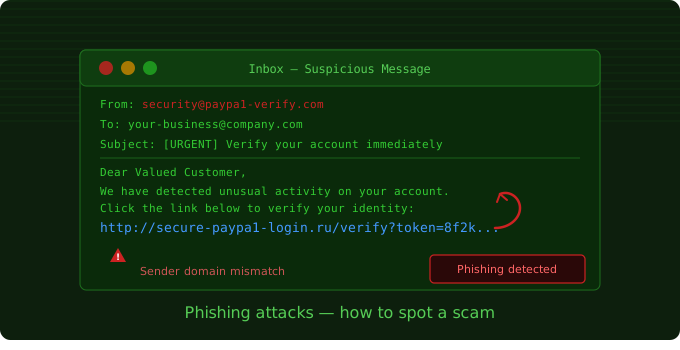
Anatomy of a real phishing email
Here's what a typical small business phishing email looks like under the hood:
From: "PayPal Security" <[email protected]>

To: [email protected]
Subject: [URGENT] Verify your account — access suspended

Dear Valued Customer,

We detected unusual activity on your account.
Click here to verify: http://secure-paypa1.ru/login

--- RED FLAGS ---
[1] Domain: paypa1.com (note the '1' instead of 'l')
[2] TLD: .ru (Russia) for a US company
[3] Urgency language: 'URGENT', 'suspended'
[4] Generic greeting: 'Valued Customer'
Red flags to watch for
- Sender domain mismatch - hover over the sender name to reveal the real address
- Urgency or fear tactics - 'Your account will be closed in 24 hours'
- Unexpected attachments - especially .zip, .exe, .docm files
- Requests for credentials or payment - no legitimate company asks for your password by email
- Grammar or formatting oddities - though AI is making these less common
Training your team
Technology can catch many phishing attempts, but human vigilance is your most reliable defense. Establish a simple policy: when in doubt, verify through a separate communication channel, call the vendor directly, or check their official website.
Run regular phishing simulations. Employees who click on simulated phishing emails receive immediate, non-punitive feedback. This approach is far more effective than lecture-based training.
Quick win: Set up email authentication (SPF, DKIM, DMARC) on your domain. This prevents attackers from spoofing your own email address to target your clients.