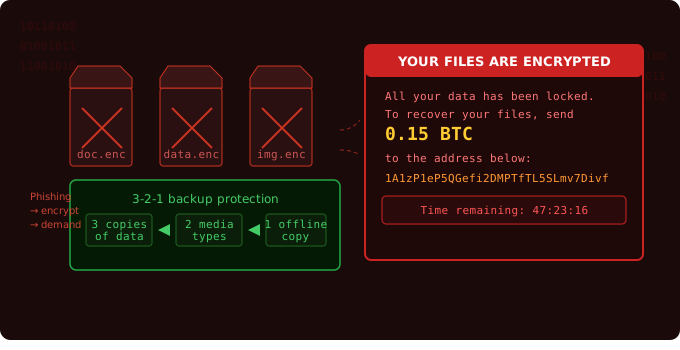

"The average ransomware attack costs small businesses $200,000 in downtime, recovery, and lost revenue — many never reopen."
Ransomware has become one of the most damaging cyber threats facing small businesses today. In a ransomware attack, criminals encrypt your files and demand payment to restore access. For a business without proper backups or a response plan, the results can be catastrophic.
How ransomware gets in
Ransomware enters your environment through several common vectors:
- Phishing emails with malicious attachments or links (most common ~70% of attacks)
- Exposed RDP ports - Remote Desktop Protocol left open to the internet
- Unpatched vulnerabilities in operating systems or applications
- Compromised vendors with access to your network (supply chain attacks)
- Drive-by downloads from malicious or compromised websites
What happens during an attack
The attack typically unfolds in stages over hours or days:
Stage 1: Initial access
  └── Malicious email opened, or RDP brute-forced

Stage 2: Persistence
  └── Attacker installs backdoor, disables antivirus

Stage 3: Lateral movement
  └── Spreads to mapped drives, connected devices, backups

Stage 4: Data exfiltration (optional)
  └── Steals data before encryption for double extortion

Stage 5: Encryption
  └── All accessible files encrypted simultaneously

Stage 6: Ransom note
  └── Demand displayed, clock starts ticking
The 3-2-1 backup strategy
A reliable backup strategy is your best insurance against ransomware. Follow the 3-2-1 rule:
- 3 copies of your data
- 2 different storage types (e.g., local drive + cloud)
- 1 copy stored completely offline or in immutable cloud storage
Critical warning: Backups connected to your network at the time of an attack will also be encrypted. Your offline or immutable copy is your last line of defense.
Prevention checklist
- Keep all systems and software fully patched
- Disable RDP unless absolutely required; use a VPN instead
- Deploy endpoint detection and response (EDR) software
- Restrict admin privileges - most users shouldn't need them
- Run phishing awareness training quarterly
- Test backup restores every 90 days
★ If you're attacked right now: Disconnect affected machines from the network immediately, do not shut them down. Call your IT provider and cyber insurance carrier. Do not pay the ransom without consulting a professional.