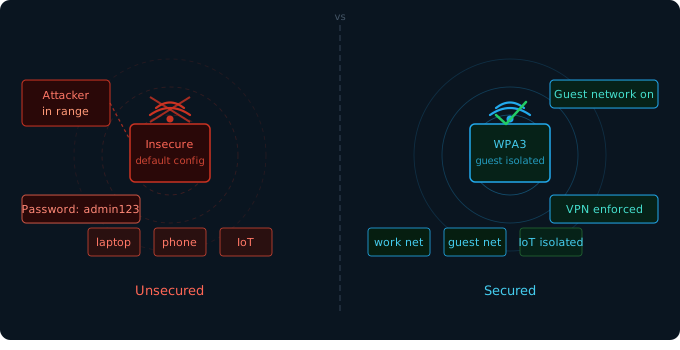

"Default router credentials are published publicly online. If you haven't changed yours, your network is already compromised — you just don't know it yet."
The wireless network in your office might be one of your most overlooked security vulnerabilities. An improperly secured Wi-Fi network gives attackers a potential foothold into your entire business infrastructure - without ever needing to physically enter your premises.
The most dangerous Wi-Fi mistakes
- Default admin credentials - routers ship with documented default passwords (e.g., 'admin/admin')
- Outdated encryption - WEP is crackable in minutes; WPA/TKIP in hours; always use WPA2-AES or WPA3
- Same network for everyone - employees, guests, and IoT devices should be isolated from each other
- WPS enabled - Wi-Fi Protected Setup has known vulnerabilities; disable it immediately
- SSID broadcasting your business name - reveals your presence and makes you a named target
Step-by-step: secure your router
bash
# Access your router admin panel (common addresses):
http://192.168.1.1
http://192.168.0.1
http://10.0.0.1

# Once logged in, change or verify:
1. Admin username + password (never leave default)
2. Encryption: WPA3 > WPA2-AES (never WEP or WPA-TKIP)
3. Network password: 16+ random characters
4. Disable WPS
5. Enable firewall
6. Disable remote management
7. Update firmware
Set up a guest network (takes 5 minutes)
Your most impactful quick win: create a separate guest network for visitors, customers, and personal phones. This network should have no access to your internal systems or printers.
- Go to your router admin panel → Wireless → Guest Network
- Enable it with a separate SSID (e.g., 'CoffeeShop-Guest')
- Set 'Access to local network: Disabled'
- Use a different, simpler password you can share freely
Remote workers: home network hygiene
Every remote employee's home router is a potential entry point to your business. Provide your team with a one-page home router checklist and require VPN for any access to company systems.
A VPN encrypts traffic between the employee's device and your business network, ensuring that even a poorly secured home router can't expose your data.
★ Bonus tip: Enable your router's access log and check it monthly. You'll see every device that connects and spot anything unfamiliar before it becomes a problem.